

Office 2024 for Windows is available at KARINEX in three editions: Standard from 19,90 €, Home from 18,90 €, and Professional Plus from 9,90 €. Standard and Professional Plus allow commercial use, Home only private use. Only Professional Plus additionally includes the Access database; Outlook is missing only in Home.
Office 2024 is available at Karinex in three variants for Windows: Standard, Professional Plus, and Home. The programs themselves are identical across all editions. The difference lies in which programs are included and how each edition may be used.
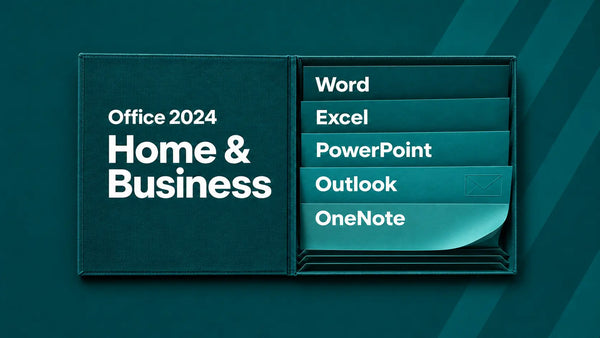
Standard, 19,90 €: Word, Excel, PowerPoint, Outlook, and OneNote. Commercial use permitted.
Professional Plus, 9,90 €: everything from Standard, plus the Access database. The premium edition for anyone who genuinely needs Access.
Home, 18,90 €: Word, Excel, PowerPoint, and OneNote. Without Outlook, private use only.

Standard
19,90 €
For freelancers and small offices. All the programs for everyday office work, without a database.
Word · Excel · PowerPoint · Outlook · OneNote
View product
Professional Plus
9,90 €
Everything from Standard plus Access. Intended for business use.
Word · Excel · PowerPoint · Outlook · OneNote · Access
View product
Home
18,90 €
For private households, school, and study. Without Outlook and without commercial use.
Word · Excel · PowerPoint · OneNote
View productWhat is the difference between Office 2024 Standard, Professional Plus, and Home?
 Standard For freelancers and small offices 19,90 € View product |
Largest scope Professional Plus For businesses and power users 9,90 € View product |
 Home For private use 18,90 € View product |
|
|---|---|---|---|
| Programs | |||
| Word, Excel, PowerPoint | ✓ | ✓ | ✓ |
| OneNote | ✓ | ✓ | ✓ |
| Outlook | ✓ | ✓ | – |
| Access (database) | – | ✓ | – |
| Product type and use | |||
| Commercial use | ✓ | ✓ | private only |
| Product type | Volume key | Volume key | Retail key |
| Term | One-time purchase | One-time purchase | One-time purchase |
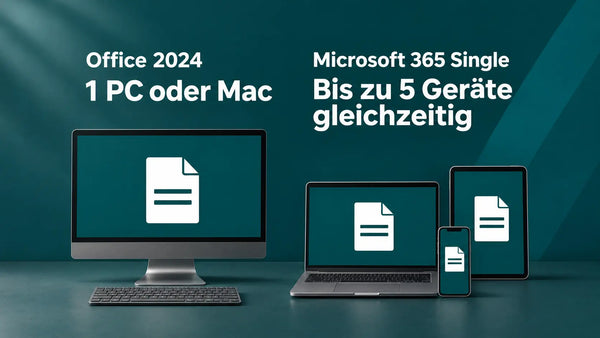
| Devices | 1 PC | 1 PC | 1 PC |
| Security updates until | 09.10.2029 | 09.10.2029 | 09.10.2029 |
On smartphones, the table can be scrolled sideways.
Microsoft Teams is not included in any of the three editions. It can be installed free of charge as a separate app and used alongside Office. Publisher is also no longer part of Office 2024 — Microsoft is discontinuing the program.
Which Office 2024 edition suits you?
Three questions are enough to find the right edition:
- Do you use Office for business?If so, Home is not an option. This edition is intended for private use only. Standard is the minimum for an office, law firm, practice, or association.
- Do you need Outlook?If so, choose Standard or Professional Plus. Outlook is not included in Home.
- Do you work with databases?Professional Plus is the right choice only if you actually use Access. Access is available exclusively in this edition, though it costs noticeably more than Standard.
What does Office 2024 Standard offer?
Microsoft Office 2024 Standard is the lean business edition. It includes Word, Excel, PowerPoint, Outlook, and OneNote — covering everyday office work completely, from correspondence to spreadsheets to email management.
The edition is intended for full commercial use, so it can be used in an office, law firm, practice, association, or company. What's missing is Microsoft Access.
Anyone who regularly works with databases needs Professional Plus.
What does Office 2024 Professional Plus offer?
Microsoft Office 2024 Professional Plus is the most comprehensive edition for Windows. It includes Word, Excel, PowerPoint, Outlook, OneNote, and Access.
Access is the real difference from the other editions. The database program is suited to customer management, inventory tracking, simple CRM systems, and reporting. It is not included in Standard or Home.
Anyone who doesn't need a database gets the same everyday office toolkit, including Outlook, with Standard for a fraction of the price.
The detailed installation guide with download links and help with error messages is on the Office 2024 Professional Plus help page.
What does Office 2024 Home for Windows offer?
Microsoft Office 2024 Home for Windows is aimed at private users, families, and students. It includes Word, Excel, PowerPoint, and OneNote.
Two points matter before buying: Outlook is not included in this edition, and the edition is intended exclusively for private use. For invoices, quotes, or any other business use, Standard is the minimum.
Home is a retail key for end customers. Standard is a volume key and therefore cheaper.
What's new in Office 2024?
Office 2024 is the successor to Office 2021 and brings recent years' improvements to your PC as a one-time purchase:
- Excel: noticeably faster with several workbooks open, new text and array functions, the IMAGE function for inserting pictures into cells, and dynamic arrays in charts.
- Outlook: improved search across emails, files, people, and appointments, plus an automatic accessibility check for outgoing emails.
- PowerPoint: Cameo embeds the live camera feed directly into slides, and Recording Studio records presentations with narration, animations, and freehand input.
- OneNote: reworked pen input with a full-screen view for handwritten notes.
- Allgemein: a refreshed design and support for the ODF 1.4 file format for better interoperability with LibreOffice and OpenOffice.
Anyone still planning with the previous version can find all editions compared in Buying Office 2021: Professional Plus, Standard, and Home compared.
What are the system requirements for Office 2024?
- Operating system
- Windows 11 or 10, 64-bit
- Memory
- 4 GB RAM
- Hard disk
- approx. 4 GB free
- Screen
- 1280 × 768 or higher
All three editions run on the same systems. Since Microsoft ended support for Windows 10 on 14.10.2025, we recommend Windows 11 Pro for new installations.
How does delivery and activation work at Karinex?
- Choose an edition and orderYou choose the right edition and complete your order. Payment is SSL-encrypted.
- Receive an email with your key and download linkOnce payment is received, you get the product key together with the download link to the Microsoft installation file and a step-by-step guide in German. You also receive a proper invoice showing 19% VAT.
- Install and activateYou install Office using the installation file and activate it with the key provided. If you have questions, support is available via WhatsApp, email, or live chat, daily from 08:00 to 23:00 (German time).
Frequently asked questions
Which edition should I choose?
For commercial use, Standard is the minimum and also the most economical choice for most buyers. Professional Plus is worthwhile if you actually use Access — it costs noticeably more. Home is only right if use stays purely private and Outlook isn't needed.
Why is Standard cheaper than Home?
Standard is a volume key, which makes it cheaper than the retail edition Home, even though Standard includes more programs. Professional Plus is also a volume key, but its price sits well above both because of the additional Access module.
How does delivery work?
Digitally by email once payment is received: product key, download link to the Microsoft installation file, a step-by-step guide in German, and an invoice showing VAT. Nothing is sent by post.
Is Publisher included in Office 2024?
No. Publisher is not part of any Office 2024 edition. Microsoft is discontinuing the program and no longer develops it.
Is Microsoft Teams included?
No. Teams is not included in any Office 2024 edition, but it can be downloaded free from Microsoft and used alongside Office.
Are the programs identical across all editions?
Yes. Word in Standard is functionally identical to Word in Professional Plus or Home. Only the selection of programs and the terms of use differ.
Can I switch from Standard to Professional Plus later?
A direct in-place upgrade isn't supported. You uninstall Standard and install Professional Plus fresh. Your documents are preserved. That's why it's worth choosing the right edition from the start.
Does Office 2024 run on Windows 10?
Technically, yes. Microsoft ended support for Windows 10 on 14.10.2025; for security reasons we recommend switching to Windows 11 Pro.
Is Office 2024 also available for Mac?
Yes, though as separate editions: Office 2024 Home & Business for Mac and Office 2024 Standard for Mac. The editions compared here are for Windows only.
What's the difference from Microsoft 365?
Office 2024 is a one-time purchase. Microsoft 365 is a subscription with ongoing costs and cloud features. Details are in the comparison Office 2024 Professional Plus vs. Microsoft 365.
Where do I find the installation guide?
On the Office 2024 Professional Plus help page. There you will find the download links, an illustrated step-by-step guide, and help with error messages.
Conclusion: which Office 2024 edition is worth it?
The comparison is clear: Office 2024 Standard is the most economical choice for most buyers. For 19,90 € you get Word, Excel, PowerPoint, Outlook, and OneNote, and commercial use is permitted.
Home is the choice for private users who want a retail key and can do without Outlook.

Microsoft Office 2024 Professional Plus
Word · Excel · PowerPoint · Outlook · OneNote · Access, one-time purchase for 1 PC, instant delivery by email
Instant delivery by email · Support daily 08:00 to 23:00